Find scattered context
Ask to review earlier work. Pi searches native session history with SQLite-backed keyword and phrase matching. One session format keeps retrieval aligned with Discussion.
Explore retrieval pi-session-memory
SQLite search. Multi-agent analysis.
Search native Pi conversation history in one local SQLite index instead of relying on lossy summaries. Discussion activates historical Pi sessions as private participants. Save cited findings as reusable knowledge.
pi install npm:pi-session-memory
Version 1.1.0 · Install from npm.
Multi-agent evidence routing
1 MAIN + 3 HISTORY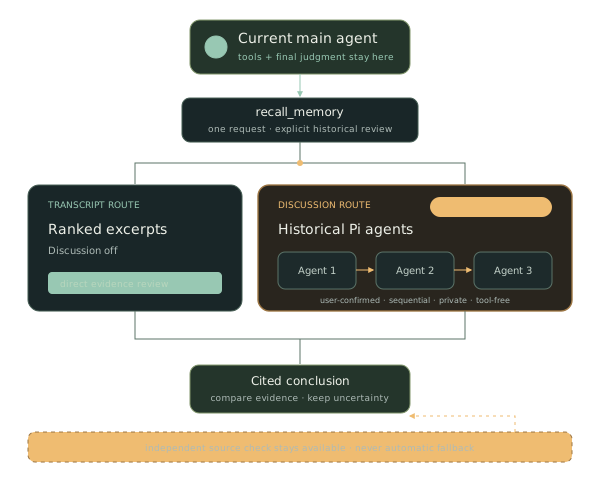
Ask to review earlier work. Pi searches native session history with SQLite-backed keyword and phrase matching. One session format keeps retrieval aligned with Discussion.
Explore retrievalActivate up to three user-confirmed native Pi sessions as historical agents. They answer privately and sequentially without changing source history.
Explore DiscussionSave cited findings, decisions, uncertainty, and actions as draft Open Knowledge Format (OKF) Markdown. Optionally use an Obsidian vault.
Explore saved knowledgeThe 1.0 multi-agent architecture
Discussion routes one recall request through user-confirmed native Pi sessions. Pi-only history avoids external formats that Discussion cannot activate directly. The main agent keeps its tools and independently checks persisted evidence.
Read ADR 0001recall_memoryone explicit historical-review requestDiscussion off. Ranked transcript excerpts return to the main agent.
User-confirmed agents answer privately and sequentially. They have no tools and never write to source sessions.
Multiple perspectives for interpretation. Persisted transcripts for verification.
The review workflow
Historical review starts only when you ask for it. Ordinary questions do not trigger transcript recall.
Read the retrieval contractInspect meeting descriptions. Reuse an existing OKF document when its description clearly matches.
Search global history and entity-matched project sessions. Expand exact turns when more context is needed.
Compare retrieved evidence directly, or activate user-confirmed native Pi sessions for optional private Discussion.
Write draft minutes and portable evidence. Keep uncertainty explicit. Participant agreement is not verification.
Get started
You need Pi and native Pi session files. This shared format supports both transcript retrieval and Discussion activation.
Read the setup guideUse the command above. Restart Pi or run /reload to load the extension.
Ask Pi: Set up pi-session-memory.
The guide explains one option at a time and saves only after your approval.
Ask Pi: Import my Pi conversation history.
You can also use the /pi-session-memory menu.
For example: Review our earlier work on offline eval and summarize the decisions and open questions.